Share Facebook

Free Parent & Teacher Tool

How to Build Your Own Printable Coloring Book

Instead of downloading and printing coloring pages one by one, you can save your child's favorite pages into custom lists and download the whole book as one combined, ready-to-print PDF in a single click.

At a Glance: My Coloring Books 100% Free

Built for busy moms, parents, and classroom teachers who want a custom coloring packet ready in under a minute.

20 Books per account
15 Pages per book
1-Click Combined PDF
1

Sign In or Create a Free Account

To keep your coloring books saved so you can access them from your phone, laptop, or classroom computer, start by signing in. You can use Continue with Google for one-click sign-in, or register with your email address.

Why an account? You can build a book on your phone while waiting in the school pickup line, then open your account on your home computer later to print it.
Step 1 · Top-right of the site header
Coloring Pages  ·  Free Tools Log in / My Account
Continue with Google (1-Click Sign In)
2

Click the Bookmark Icon on Any Coloring Page

While browsing any category, look at the bottom-right corner of each coloring page card. Right next to Download PDF and Print, you will see the Bookmark (+) button.

Once a page is saved to one of your books, that icon automatically turns emerald green with a checkmark, and hovering over it tells you which book(s) it is saved in!

Step 2 · On every coloring page card
Before saving (click the + bookmark):
Download PDF
After saving (turns green + shows book name on hover):
Download PDF
3

Pick a Book or Create a New One on the Spot

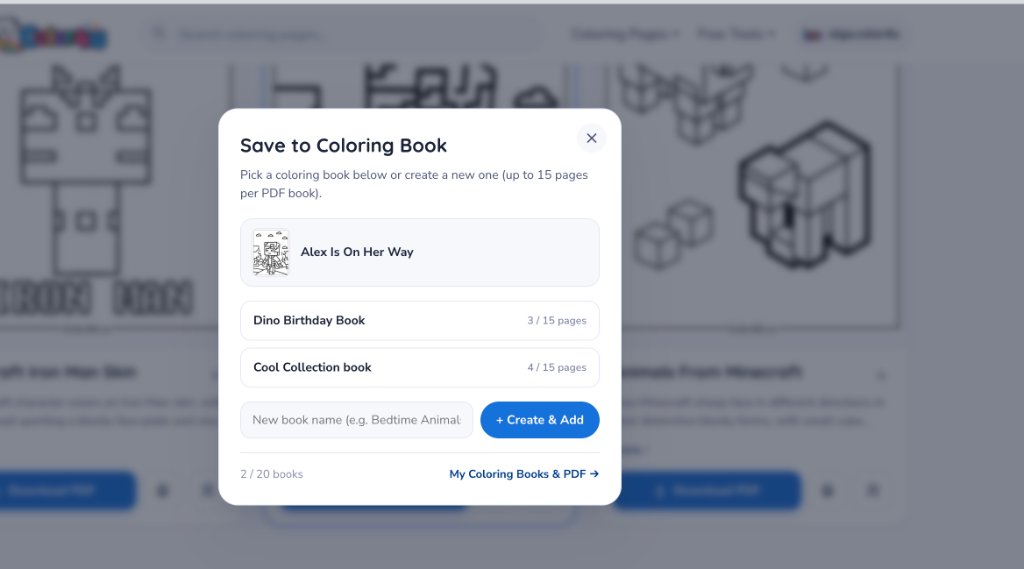
Clicking the bookmark button opens the Save to Coloring Book window:

  • Select an existing book from the dropdown (it remembers the last book you used so adding 10 pages in a row takes one click each).
  • Or type a name in New book name (like "Dino Birthday Book" or "Mia's Road Trip") and click + Create & Add.
Each coloring book holds up to 15 pages, and you can keep up to 20 different books in your account.
Step 3 · Save to Coloring Book modal Save to Coloring Book popup window showing book selection and Create and Add button
4

Download Your Combined PDF Book in 1 Click

When you are ready to print, click My Coloring Books & Download PDF (or click your name in the top header to open My Coloring Books).

Click Download PDF on any book and your browser will combine all the pages in that list into a single, print-ready US Letter / A4 PDF file. Open it, hit Print once, and your custom coloring book is ready!

Step 4 · Inside your Account (My Coloring Books tab)
🦕
Dino Birthday Book 8 / 15 pages
Download PDF
✓ Combines all 8 pages into dino-birthday-book.pdf right in your browser so you can print the whole set at once.

4 Fun Ways Moms & Teachers Use Custom Coloring Books

A few of our favorite ideas from families and classrooms using Color4U.

🎂 Birthday Party Favor Books

Pick 8 to 10 pages that match your child's birthday theme (dinosaurs, princesses, monster trucks, or space), print a copy for each guest, and fold or staple them with a small pack of crayons.

✈️ Road-Trip & Flight Quiet Packs

Before a long drive or flight, let each child pick their own 15 favorite pages across different categories. Print each child's personal book in one click so there is zero arguing over pages.

🏫 Classroom Early-Finisher & Seasonal Packets

Teachers can save up to 20 themed packets (Fall Harvest, Ocean Animals, Space Week, Indoor Recess) and reprint any packet next semester without hunting for individual files.

🎨 Custom Name Cover + Coloring Book

Use our Name Coloring Page Generator to print a personalized cover sheet with your child's name, then staple it on top of their custom PDF coloring book!

Olga Aksenova
Written by the Co-founder & Illustrator

Olga Aksenova

Hi! I'm Olga, co-founder and illustrator at Color4U. We built My Coloring Books after hearing from moms and teachers who loved our pages but wished they didn't have to open and print 12 separate PDF tabs before a birthday party or class activity. I hope this tool saves you time and brings lots of creative fun to your home or classroom!

More about Olga & Color4U Follow Olga on Instagram

Frequently Asked Questions

Is My Coloring Books completely free?

Yes! Creating an account, saving coloring books, and downloading combined PDF books are 100% free for personal, family, and classroom use.

How many pages and books can I create?

You can create up to 20 custom coloring books in your account, and each book can hold up to 15 coloring pages.

Can I remove a page or rename a coloring book later?

Yes. Inside your account under the My Coloring Books tab, you can rename any book, remove individual pages, or delete a book whenever you like. You can also click a saved green bookmark icon on any card to remove it.

What paper size is the downloaded PDF book?

Every page in your combined PDF book is formatted to print cleanly on both standard US Letter (8.5 × 11 in) and A4 paper.